Features
Everything the platform does, in one place.
From the code on the table to the kitchen queue, the admin dashboard and the payout into your own account — here is each part of MYDIX and what it gives your property.
QR digital menu and ordering
A menu that opens from the code on the table.
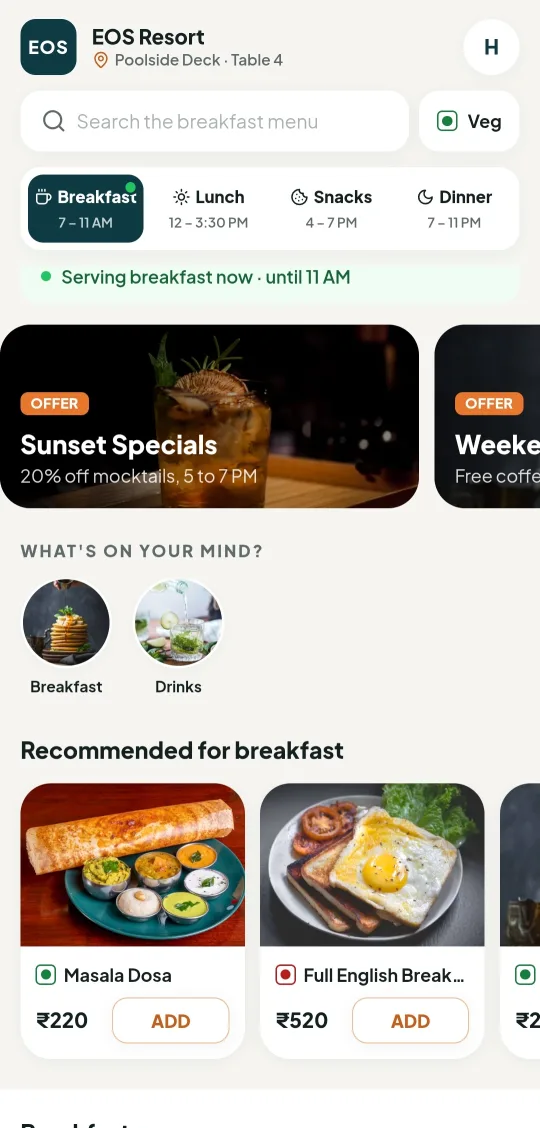
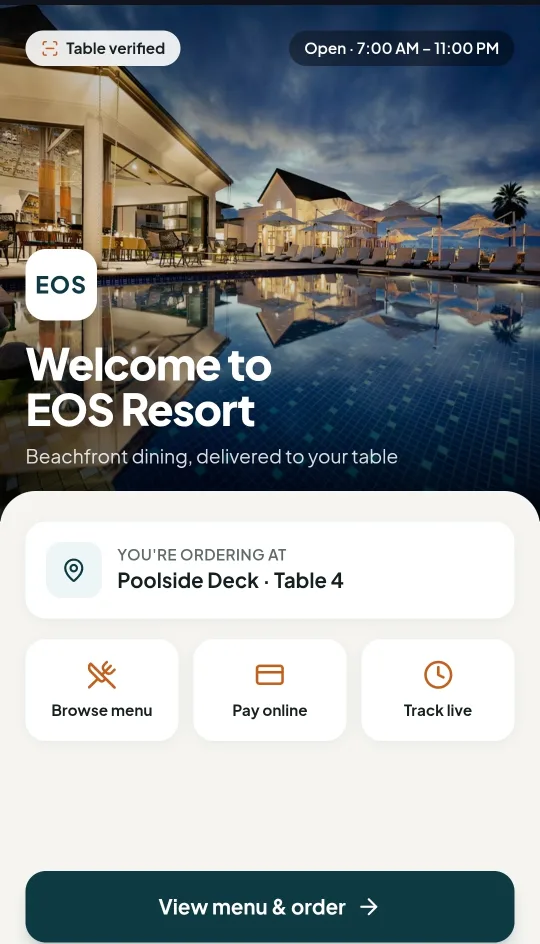
Each room, table and outlet gets its own code. Scanning it opens your menu in the guest’s browser with their location already attached, so an order from Poolside Deck, Table 4 reaches your team labelled exactly that way.
- Dayparted menus with their own serving windows
- Veg and non-veg markers, offers and recommendations
- Cart, kitchen notes and checkout in the same flow
- Runs in the browser — no guest app to install
Live orders
#AX-5204
Poolside Deck · Table 4
#AX-5205
Terrace · Table 11
#AX-5206
Room 204
Kitchen dashboard
One queue the kitchen can actually work through.
Incoming orders land in a single live queue instead of being relayed by hand. Staff move each order along its steps, and the guest sees the same progress from their phone.
- Live queue of incoming and in-progress orders
- Each order tagged with its outlet and location
- Status moves from accepted to preparing, ready and served
- Kitchen notes and dietary markers carried with the order
Service requests
Extra towels
Room 204 · Housekeeping
Turndown service
Room 118 · Housekeeping
Late checkout
Room 301 · Front desk
Guest services and housekeeping
Requests reach the right team, not the nearest person.
Housekeeping and service requests come in through the same code the guest already scanned, so they arrive with the room or location attached and are routed to the team that handles them.
- Requests raised from the room or any public space
- Routed by type to the responsible team
- Tracked through to completion, like an order
- No phone call and no trip to reception
Services
Airport transfer
₹1,800Extra towels
FreeLate checkout
₹500Wake-up call
FreePaid and free services
Offer a service free, or price it — your call.
Not everything a property offers is a menu item. Services can be published free of charge or carry a price, and you decide which is which per service and per location.
- Publish a service as free or priced
- Configure availability per outlet or location
- Paid services settle through the same checkout
- Change pricing without republishing codes
Outlets
Poolside Deck
7:00 AM – 11:00 PM
The Terrace
12:00 PM – 11:00 PM
In-room dining
24 hours
Hotel and resort admin
The property, modelled the way it actually runs.
Outlets, locations, menus and serving hours are set up to match how your property is laid out — several restaurants across a resort do not have to collapse into a single list.
- Multiple outlets, each with its own menu and hours
- Rooms, tables and public spaces as distinct locations
- Menu, pricing and availability managed in one place
- Changes go live without reprinting anything
Roles and permissions
Staff management and RBAC
People see the part of the system they work in.
Staff accounts are assigned roles, and each role carries its own permissions. Kitchen staff, floor staff and management get the access their job needs and nothing beyond it.
- Role-based access control across the platform
- Accounts scoped to the outlets they work in
- Permissions managed centrally by an administrator
- Access removed cleanly when someone leaves
Order tracking and reports
Everyone sees the same order, at the same stage.
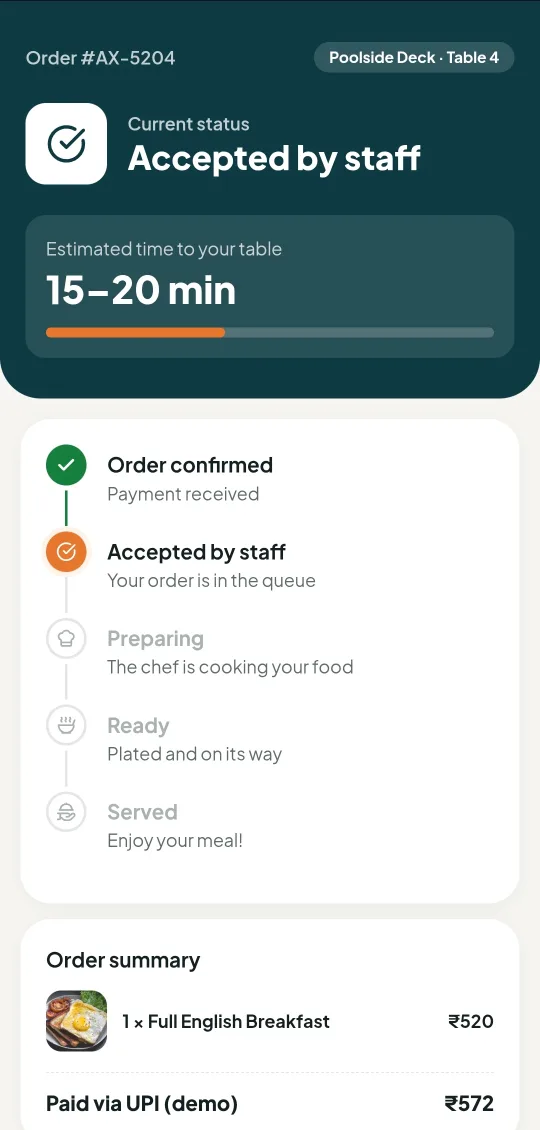
Guests follow their order from confirmed through to served, with an estimated time to the table. The same history gives management a record of what was ordered, from where, and how it moved.
- Live status shared by the guest and your team
- Estimated time to the table shown to the guest
- Order history retained per outlet and location
- Operational reporting built on the same record
Razorpay integration
Payments settle into your own Razorpay account.
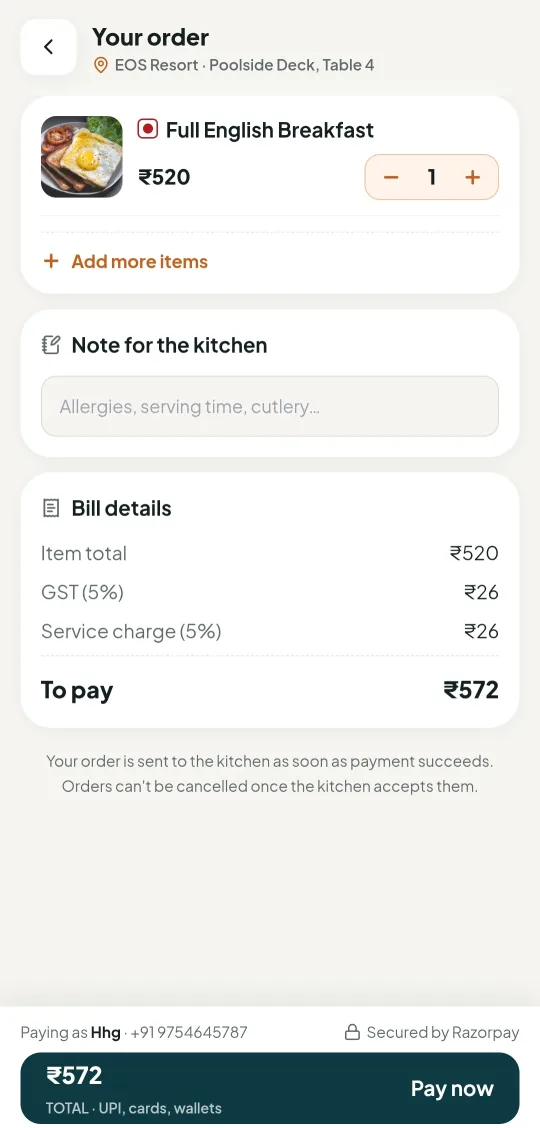
Checkout runs through Razorpay using the property’s own account, so takings go directly to you. The bill is itemised on screen — item total, taxes and service charge — before the guest confirms.
- Connected to the hotel’s own Razorpay account
- Itemised bill shown before payment is taken
- Order is sent to the kitchen once payment succeeds
- UPI, cards and wallets through the same checkout
QR codes
QR code generation
Codes for every room, table and deck.
Generate a distinct code per location and manage the whole set from one place. Because the code carries the location, the same menu serves every table without anyone choosing where they are sitting.
- A unique code per room, table or outlet
- Generated and managed centrally
- Location travels with every order placed
- Reassign or regenerate a code without reprinting the menu
Get started
See these working on your own menu.
A short demo walks through the guest side and the management side, using examples that match how your property already serves.